MeetScheduler




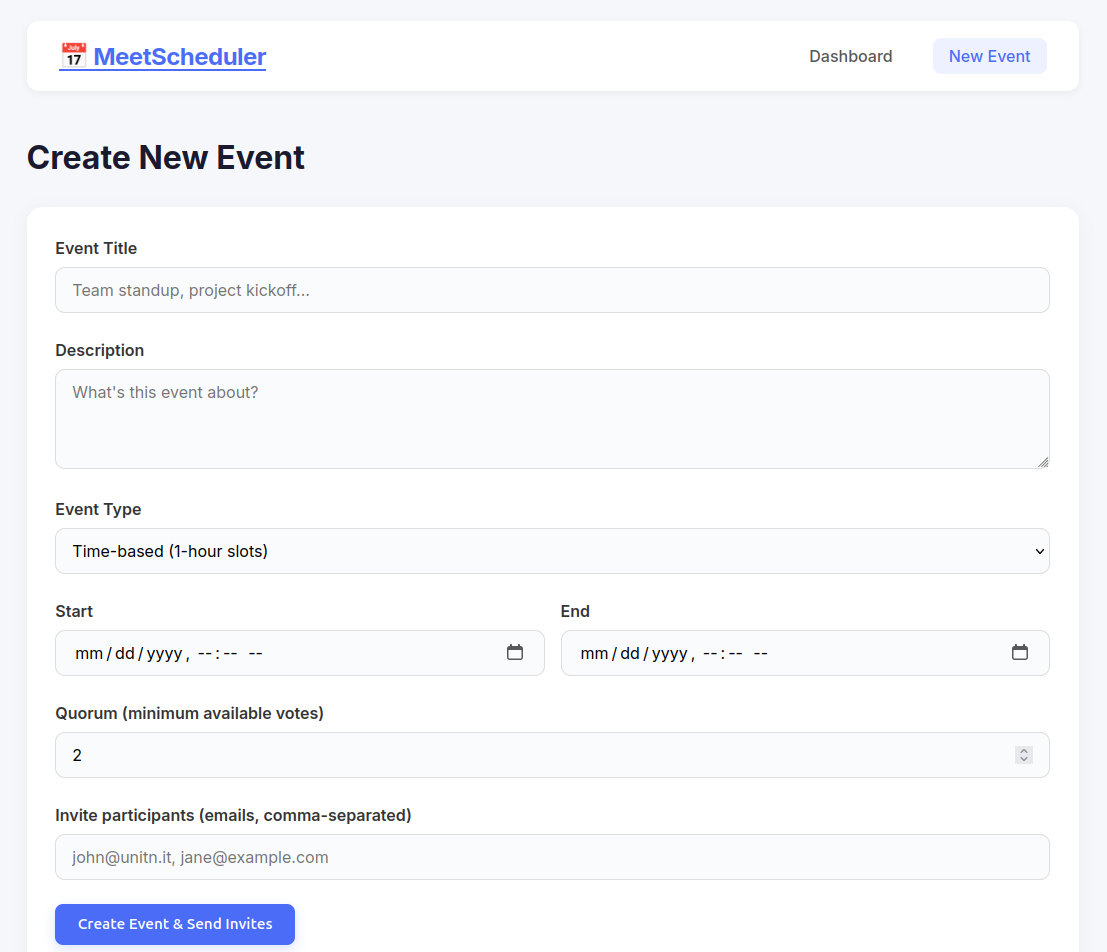
MeetScheduler is a full-stack web app inspired by Doodle. It helps groups create meeting events, invite participants, collect availability, and identify the best time slot once enough people are available.
The project was built for HackaPrompt AI 2026 at the University of Trento, a hackathon focused on building software with large language models and reflecting critically on AI-assisted programming.
Screenshots
Features
- Create time-based or full-day events
- Generate 1-hour slots automatically for time-based events
- Invite participants by email
- Collect participant responses: available, maybe, or unavailable
- Show responses in a color-coded availability grid
- Highlight the best slot when quorum is reached
- Connect Google Calendar to show busy periods
Tech Stack
| Layer | Technology |
|---|---|
| Frontend | React 18, React Router, Vite, custom CSS |
| Backend | Node.js, Express |
| Data storage | Local JSON file storage |
| Calendar | Google Calendar API |
| Authentication | Google OAuth 2.0 |
| Nodemailer with Gmail SMTP |
Quick Start
1. Clone the project
git clone https://github.com/lewisndambiri/meeting-scheduler.git
cd meeting-scheduler
2. Install dependencies
cd server
npm install

cd ../client
npm install
3. Configure environment variables
Create a server environment file:
cd ../server
cp .env.example .env
Then update .env with your Google OAuth and Gmail app credentials:
GOOGLE_CLIENT_ID=your-client-id.apps.googleusercontent.com
GOOGLE_CLIENT_SECRET=your-client-secret
GOOGLE_REDIRECT_URI=http://localhost:3001/api/auth/google/callback
BASE_URL=http://localhost:5173
EMAIL_USER=youremail@gmail.com
EMAIL_PASS=your-app-password
4. Run the app
Start the backend:
cd server
npm run dev
Start the frontend in another terminal:
cd client
npm run dev
Open http://localhost:5173.
Project Structure
meeting-scheduler/
├── client/
│   ├── index.html
│   ├── vite.config.js
│   └── src/
│       ├── App.jsx
│       ├── App.css
│       ├── api.js
│       ├── components/
│       │   └── Navbar.jsx
│       └── pages/
│           ├── Home.jsx
│           ├── CreateEvent.jsx
│           └── EventDetail.jsx
├── server/
│   ├── server.js
│   ├── config.js
│   ├── auth.js
│   ├── store.js
│   └── routes/
│       ├── auth.js
│       ├── calendar.js
│       ├── events.js
│       └── invite.js
├── docs/
│   └── assets/
└── README.md
HackaPrompt AI 2026
HackaPrompt AI 2026 took place on April 23, 2026 at Polo Fabio Ferrari, Povo, Trento, Italy. The challenge asked students to build software with the help of large language models while observing where AI tools are effective and where human review is still essential.
Key reflections from this project:
- AI tools were useful for quickly scaffolding React and Express code.
- Human review was still needed for security, environment setup, UX decisions, and project coherence.
- Integrations such as Google OAuth, Gmail SMTP, and calendar availability require careful manual configuration.
- Timezone handling, token storage, validation, and deployment choices remain important areas for future improvement.
Future Improvements
- Replace JSON file storage with PostgreSQL or MongoDB
- Store OAuth tokens securely with sessions or a database
- Add participant authentication or magic links
- Improve timezone handling for international users
- Add automated tests for API routes and voting logic
- Add Docker support for easier deployment
Author
Lewis Ndambiri
- Portfolio: lewisndambiri.github.io
- GitHub: github.com/lewisndambiri
License
MIT